Tesla’s Houston Galleria store grand opening this weekend

The grand opening of Tesla’s Houston Store is happening this weekend! Saturday October 22 from 10am to 9pm and Sunday October 23 from 11am to 7pm.

I have a Tesla Model S on reserve and I’m 1500 on the waiting list of 5000. I’m glad to see them launching a presence in Houston because it should eventually mean they’ll have some service infrastructure here. If you’re interested in learning more, I toured the new Tesla factory in Fremont a few weeks ago.

Flyer shown below…

How to get past “The best driver software for your device is already installed” in Windows 7

File this one under solutions to random things that could make you pull your hair out…

If Windows 7 thinks it’s smarter than you and keeps telling you “The best driver software for your device is already installed” when you’re trying to update a device driver to something you KNOW is a better driver, here’s how to get around Windows 7’s “smarts”…

What lead me into this situation is:
1) I chose “Update Driver Software” from Device Manager (in my case, my a monitor that was showing up as “Generic Non-PNP Monitor”)
2) Then I chose “Browse my computer for driver software”
3) Then I chose the directory with the CORRECT driver and
4) Finally I’d get the message “The best driver software for your device is already installed”.

Argh! After doing this a bunch of times, I figured out the right way to address this… It’s actually pretty simple.

1) Choose “Update Driver Software” (SAME as above)
2) Choose “Browse my computer for driver software” (SAME as above)
3) Choose “Let me pick from a list of device drivers on my computer” (DIFFERENT!)
4) Click “Have Disk” button (DIFFERENT!)
5) Select the directory with the correct drivers and then select the monitor make/model
6) You’re done! Congrats, you’ve outsmarted Windows 7! 🙂

No more dialing with your fingers! (with Google Voice + Google Chrome)

In the last few weeks, I haven’t dialed a single phone number and I love it! So how am I making phone calls? Using:
1) Google Voice account
2) Google Chrome, and
3) the Google Voice Add-on for Google Chrome.

Here’s how to set it all up:

  1. Create yourself a Google Voice account
  2. Add your phone numbers (mobile, office, home, etc) to your Google Voice account
  3. Install the Google Voice Extension for Google Chrome, available here in the Chrome web store: http://goo.gl/TidpC
  4. Now, anytime Chrome sees a phone number in your browser, it’ll become a link. When you click, it’ll ask you where you want to take the call and it’ll call you there, and when you pick-up, it’ll connect you to the number you clicked on.
  5. No more finger dialing!

My review of the Tesla Roadster (ie an all-electric sports car)

Tesla Roadster

A while back, I borrowed a friend’s Tesla Roadster for a few days and I’ve always wanted to share my notes on trying it out… So here they are:

* At low speeds: felt like driving a golf cart (no power steering).
* The pickup impressed me, lot of fun to drive down an open winding road.
* Getting in and out was a pain, and I’m not very big. But once in there’s enough room inside.
* Computer shows you how many gallons of gas and barrels of oil you’ve saved — smart and neat.
* Starting the car should be more straightforward (or maybe I should just be smarter? :-)).
* They should put a van de graff generator in the trunk (where the battery is) as a gimmick.
* I liked all the carbon fiber – on the rollbar (is that what it’s called?), around the battery in the trunk.
* It’s neat how clean the thing is – ie no explosions and the ensuing mess (I’ve told people you could eat a meal off the motor’s heat sink… no grease whatsoever!)

And here are some photographs I took of my friend’s Tesla Roadster:

What is Montessori– a good, short summary

I often find myself describing what I’ve observed and learned about Montessori education so I liked the summary of Montessori in this Harvard Business Review article (“Montessori Builds Innovators”) taken from Wikipedia:

• mixed-age classrooms, with classrooms for children aged 2½-or-3 to 6 by far the most common,
• student choice of activity from within a prescribed range of options,
• uninterrupted blocks of work time,
• a Constructivist or “discovery” model, in which students learn concepts from working with materials, rather than by direct instruction, and
• specialized educational materials developed by Montessori and her collaborators.

My take on Google’s acquisition of SageTV

First congratulations to SageTV for being acquired by Google!

SageTV is a company I’ve followed closely — my company, SnapStream, and SageTV were direct competitors in the “consumer DIY home theater PC” market until we shifted our focus to TV search instead.

Here are some of my opinions on this deal…

1. It’s NOT about turning Google TV into a DVR

I consider it impossible that Google acquired SageTV so they could add native DVR capabilities to Google TV (remember, Google already manages the program guide, channel changing, and even automating your native DVR). I recently read “In the Plex” by Steven Levy and it gives a glimpse of how Google thinks — and for Google, the future is all about the Internet and the cloud. For example, this is the company that declared the filesystem dead when they designed their recently released ChromeOS: “I don’t think we need files anymore” (from here in the book). And Googlers evidently joke that their product-focused co-founder and CEO, Larry Page, “went to the future and came back to tell us about it.”

DVR is too complicated to setup and it’s complicated to use (which is easier: schedule a recording and then watch it after it’s been broadcast vs. “click here to watch”???). DVR is a technology that bolts onto a broadcast medium and makes it “on-demand”…sort of. So it’s no surprise that aftermarket DVRs have NOT been a huge success (see TiVo) while online video (like Hulu, Netflix) HAS been hugely successful.

I just don’t think DVR is what Google envisions for the future of the home theater and living room entertainment.

2. Maybe it’s to accelerate cheaper Google TV hardware

One of the things SageTV had done was port the SageTV user interface to a Sigma reference design set-top box (I know their first generation set-top box — I think they called it an “extender” — was Sigma-based, but I’m not sure if the second generation set-top box was or not?).

Google TV’s 1.0 launch seems to have been commercially weak with low unit sales numbers from Logitech and Sony and, in both cases, significant price decreases (And immediate commercial success may not even have been a goal of Google TV v1– Google probably got what they wanted out of v1, which was a lot of instructive user testing and market feedback).

In any case, part of their go-to-market strategy for version 2 could be to make cheap reference designs available to anyone who wants to ship Google TV, either standalone or as a part of their device (ie on their TV, optical media player, satellite receiver, etc). And the SageTV team could accelerate this for Google TV, with their experience writing set-top box “middleware.” A healthy partnership with a lot of different hardware manufacturers (HTC, Motorola, Samsung) is a big part of how Android succeeded and continues to succeed in mobile.

3. What about Avtrex?

A company that came to mind when I read about Google acquiring SageTV was one that a lot of people probably haven’t heard of: Avtrex. I don’t know a lot about them, but I met with them once and have loosely followed them over the years. They’re an OEM-only digital home entertainment software company– that I know of, all the software they’ve written has been in Linux and has been written with various embedded hardware system platforms in mind (Broadcom, Philips, ATI/AMD, etc). I don’t know the answer, but I think it’s interesting to ask the question of why Google would have bought SageTV over, say, Avtrex? Or, who knows, maybe we’ll see Avtrex get acquired by Google too?

Update, 1:50pm, Monday June 20, 2011:

  • GigaOM writer Janko Roettgers agrees with me but “bets his money” that Google’s going to integrate SageTV’s place-shifting technology into Google TV. My response from the comments there: I doubt it’s the placeshifting thing. In the same way that DVRs require hard drives, placeshifting requires hardware to transcode from the source format to the target format and bit-rate that the audio/video get streamed out in. And I think one of the things that Google will react to in Google TV 2.0 is the high cost of Google TV 1.0 devices (Logitech Revue was originally $400 and the least expensive Sony TV with Google TV is $600 today and was more at launch). And plus, if DVR is relatively difficult to use (as I argue it is), place-shifting is probably 10 times more difficult to setup and get running.
  • Correction: Two commenters pointed out that DVRs have in fact been very successful (40% attach rate in the United States) — they just haven’t been successful in the after market (ie TIVO). I stand corrected, they’re both right, I really meant “aftermarket DVRs” (and I’ve updated the post to reflect this). But my argument still stands, DVR just doesn’t fit the mold of big ideas that Google goes after from what I’ve seen of the company myself and from what I’ve read/heard.
  • For fun (!), here’s my parsing of the note posted on their site: “And as the media landscape continues to evolve [Ch-ch-ch-ch-changes!], we think it’s time our vision of entertainment management grows as well [by joining Google, we’re ceding our vision to Google’s larger vision]. By teaming up with Google, we believe our ideas will reach an even larger audience of users worldwide on many different products, platforms and services [We’ve been acq-hired! There’s a lot of different stuff we’ll be working on at Google, applying our expertise to Google digital home efforts]” 🙂
  • One last thing… how many people do others think work at SageTV? I never got the impression that they were more than 6 or 7 people. Anyone else have any other ideas? Did they take outside investment? I’d love to hear if people have a sense of either of these things.
  • Brent Evans “partially agrees” with me but says I’m missing the complete picture of SageTV’s value. I’d love to hear more!

But wait… It can’t be used for email? (Google Apps user managed storage)

Google announced user managed storage today. “Hallelujah!” I told my IT manager.

But WAIT, extra storage can’t be applied to a user’s email account?! This is totally puzzling. Is it because one of the primary differences (and drivers for upgrades) between Google Apps Premier and the free version is email storage capacity? Fine, then limit storage upgrades to premier edition customers (who are already paying) and let them expand _their_ email storage.

This is huge pain for us, with 5-10 users who are constantly hitting 100%, whose email accounts then need to be thinned out using various annoying and tedious techniques.

Wasn’t the gmail promise that we’d never have to delete emails?

Control your home A/C with your iPhone for $100

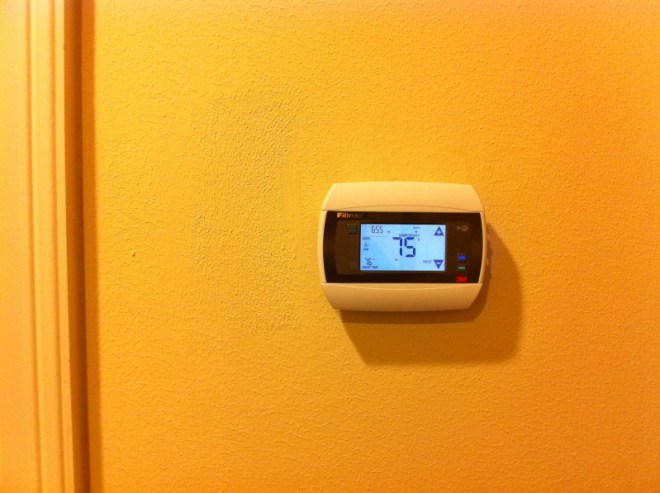
This weekend, I replaced my home thermostats with two wifi thermostats made by 3M and sold at Home Depot (Model #3M-50). Now I can control my home’s heating and cooling from anywhere inside our home or when I’m out of the house, simply by firing up an iPhone app!

Setup was _almost_ as easy as it could have been. The one thing 3M could have done better was make clear that unit requires _wired_ power because of the wifi. Incidentally, getting power to the 3M unit wasn’t hard– they have a video on their site that explains it really well. You simply take one of the unused wires in the bundle of A/C control cables that run from your A/C’s “computer” to your thermostat and you connect it to the power terminals on both ends.

Setting up the first unit, without breaks, probably took an hour and fifteen minutes. The second unit was done in under 30 minutes (because I knew exactly what I was doing).

In general, the unit works really well. Connectivity was one of my concerns because I’ve seen wifi devices that frequently lose connection– but so far it’s worked just fine whether I’m in the house on the wireless LAN or out of the house on another LAN or on my cell phone’s 3G connection. There’s an almost negligible lag time (less than 1s?) from making a setting change on your iPhone to having it show up on the corresponding thermostat.

Only complaint, so far: the physical thermostat device could be more user friendly. The main complaint here is that they stuck an important button (the “mode” button) on the right _side_ of the thermostat. So 1) it’s not self-evident how to toggle the mode (from HEAT to COOL to OFF), I think most people (like me) will have to spend a moment figuring out where it is and 2) once you know where the button is, you still have to check around the side to make sure you’re pressing the right one.

But overall, this product looks like it’ll be a winner at our house. I’m hoping to see a reduction in our gas and electrical bills because this will make it easier to turn down/off the A/C or heating when we go out of the house. We’ll see! I’ll post more as we continue to use this thing.


My old Honeywell thermostat


The 3M-50 wifi thermostat that I bought at Home Depot for $100 each


Here's the 3M-50 Wifi thermostat installed


Here's the 3M-50 wifi thermostat close-up


And finally, the reason I did all this, the iPhone app I can use to control my A/C and heating– here it’s showing the current configuration for my upstairs and downstairs iPhone apps